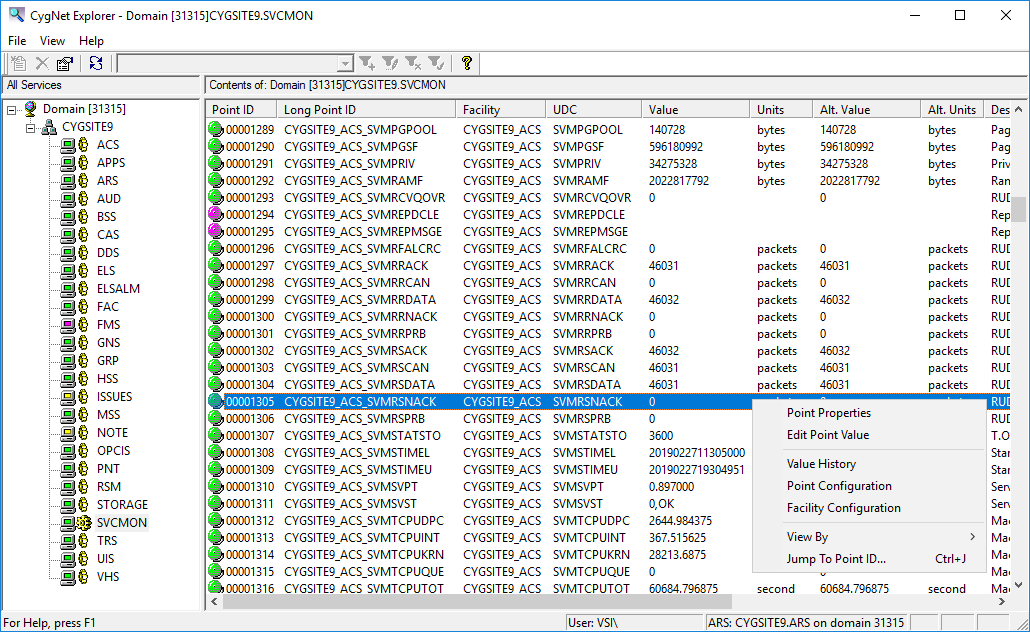
The Service Monitoring Service (SVCMON) is a specialized current value service that provides a method to monitor many system, service, and site statistics. The SVCMON can be used to perform service health checks, check ping times, monitor disk utilization, software and operating system version numbers, memory usage and ping times. Attributes of specific services can also be monitored, such as VHS database utilization and percent full, pending GNS notifications, total points and maximum points for current value services, and Address Resolution Service license counts.
Additionally, the SVCMON supports a defined set of calculation types. Point tags can be added to monitor deltas and rate changes. For point tags that represent file sizes, items can be scaled. The maximum point count for the SVCMON is 500,000 points.
Click the following image to see an example SVCMON Service:
The following table lists and describes the context menu options that display when you right-click in the SVCMON service pane.
| Option | Description |
Shortcut |
|---|---|---|
|
Point Properties |
Select to access the Properties for Point dialog box, containing the PNT properties editor for the selected point. |
|
|
Edit Point Value |
Select to edit the point value for the selected point. |
|
|
Value History |
View the History Values for a point. |
|
|
Point Configuration |
Select to access the Properties for Point dialog box, containing the PNT properties editor for the selected point. |
|
|
Facility Configuration |
Select to access the Properties for Facility dialog box, where you can edit Facility properties for the point. |
|
|
View By |
Sort the list of points by facility, long point ID, point ID, or UDC.
|
|
|
Jump To Point ID... |
Jump to selected point or item. The sort column is based on the View By choice. Shortcut is Ctrl+J. |
Ctrl+J |
More:
 SVCMON Configuration File Keywords
|
|
|

